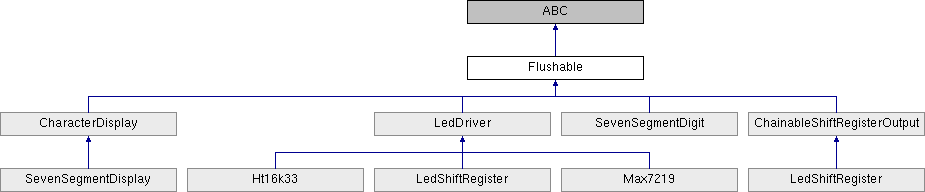
Base class for any type of output device that can be flushed. More...
Public Member Functions | |
| def | __init__ (parent) |
| def | flush (force) |
| Flush the current property values to the physical hardware. More... | |
Public Attributes | |
| auto_flush | |
| parent | |
Detailed Description
Base class for any type of output device that can be flushed.
Many output devices — like LED drivers, GPIO port expanders, or displays — are "flushable" devices. They contain individually-addressable components (such as individual GPIO pins): in certain applications, the user may wish to address them individually; while in other applications, the user may want to configure the individual components, and then flush the changes to the device in one fell swoop. This is more performant, but less intuitive.
Peripherals that expose a Flushable base class let users have it both ways: by default, the device is in "auto_flush" mode, so any changes to the peripheral's properties are written out to the device immediately. However, when auto_flush is set to False, changes to the peripheral's properties are only flushed out to the device when the user calls the flush() method.
Constructor & Destructor Documentation
◆ __init__()
| def __init__ | ( | parent | ) |
Member Function Documentation
◆ flush()
| def flush | ( | force | ) |
Flush the current property values to the physical hardware.
:param force: whether to force an update, even if the library thinks the hardware's current state matches the state defined by the properties in the class.
This method only needs to be called when auto_flush is False (the default value is True). When auto_flush is True, the device will automatically update each time a property is changed. Otherwise, call flush() whenever you wish to update the device.
Some libraries keep track of the state of the physical hardware, and will only update properties that do not appear to have changed. However, if the device is externally reset (or on initial power-up), the user should set force=True in the flush() command, to force-write all changes to the device.
:return: None
Member Data Documentation
◆ auto_flush
| auto_flush |
◆ parent
| parent |
The documentation for this class was generated from the following file:
- F:/Git/treehopper-sdk/Python/treehopper/libraries/flushable.py