Built-in I/O pins. More...
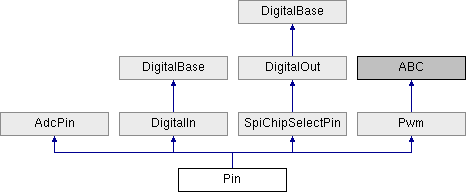
Public Member Functions | |
| def | make_analog_in () |
| Make the pin an analog input. More... | |
| def | make_digital_open_drain_out () |
| Make the pin an open-drain output. More... | |
| def | make_digital_push_pull_out () |
| Make the pin a push-pull output. More... | |
| def | make_digital_in () |
| Make the pin a digital input. More... | |
| def | enable_pwm () |
| Enable the PWM functionality of this pin. More... | |
| def | __str__ () |
Public Attributes | |
| max_voltage | |
| analog_voltage_changed | |
| (EventHandler) an event that fires with new voltages received More... | |
| analog_value_changed | |
| (EventHandler) an event that fires with new value received More... | |
| adc_value_changed | |
| (EventHandler) an event that fires with new ADC value received More... | |
| adc_value_threshold | |
| (float) the threshold for adc_value_changed events More... | |
| analog_value_threshold | |
| (float) the threshold for analog_value_changed events More... | |
| analog_voltage_threshold | |
| (float) the threshold for analog_voltage_changed events More... | |
| digital_value_changed | |
Properties | |
| spi_module = property | |
| number = property | |
| Get the pin numbe. More... | |
| digital_value = property | |
| Digital value for the pin. More... | |
| reference_level = property | |
| Gets or sets the ReferenceLevel for the pin. More... | |
| mode = property | |
| The pin's mode. More... | |
| duty_cycle = property | |
| Gets or sets the duty cycle of the PWM pin, from 0.0-1.0. More... | |
| pulse_width = property | |
| Gets or sets the pulse width, in ms, of the pin. More... | |
| adc_value = property | |
| Immediately returns the last ADC value (0-4095) captured from the pin. More... | |
| analog_voltage = property | |
| Immediately returns the last analog voltage (0.0 - 3.3V) captured from the pin. More... | |
| analog_value = property | |
| Immediately returns the uniform last analog value (0.0 - 1.0) captured from the pin. More... | |
Detailed Description
Built-in I/O pins.
Quick guide
Once you have connected to a TreehopperUsb board, you can access pins through the pins property of the board.
You can manipulate pins directly:
Or create reference variables:
You can choose whether a pin should be a digital input, digital output, analog input, or soft-PWM output by setting the pin's mode property to one of the values in PinMode.
You can set or retrieve the digital value of a pin by accessing the digital_value property. Note that writing to this property — even if the pin is an input — will implicitly change it into an output.
If the pin is set as an analog input, you can access its data through any of the following properties:
- analog_value: retrieve a normalized (0.0 - 1.0) pin value
- analog_voltage: retrieve the voltage (0.0 - 3.3) on the pin
- adc_value: retrieve the raw ADC value (0 - 4095) of the pin
More information
This section dives into more details and electrical characteristics about Treehopper's pins.
Pin mode
You can choose whether a pin should be a digital input, output, or analog input by setting the pin's Mode property.
Digital outputs
All pins on Treehopper support both push-pull and open-drain outputs. Writing a true or false to the pin's digital value will flush that value to the pin.
- Push-Pull: Push-pull is the most commonly used output mode; when a pin is set to true, Treehopper will attempt to drive the pin to logic HIGH (3.3V) — when a pin is set to false, Treehopper will attempt to drive the pin to logic LOW (0V — ground).
- Open-Drain: Open-drain outputs can only drive a strong logic LOW (0V); in the HIGH state, the pin is weakly pulled high.
Output current limitations
Treehopper's output impedance varies, but is roughly 100 ohm source and 50 ohm sink when supplying weaker loads, but increases as the load increases. In the worst-case scenario (when short-circuited), Treehopper can source approximately 20 mA of current, and sink approximately 40 mA of current. The pin's drivers are rated for a maximum of 100 mA of output current, so you cannot damage the board by short-circuiting its output to ground or 3.3V.
While this is plenty of current for peripheral ICs and small indicator LEDs, do not expect to drive large arrays of LEDs, or low-impedance loads like motors, solenoids, or speakers directly from Treehopper's pins. There are a wide variety of peripherals in the Treehopper.Libraries package for your language API that can be used for interfacing with these peripherals.
- Warning
- To avoid damaging the device permanently, do not source or sink more than 400 mA of combined current out of the pins on the board! Note that these limits have nothing to do with the 3.3V supply pins found on Treehopper, which can comfortably source 500 mA — or the unfused 5V pin, which has no imposed current limit ( other than that of your computer).
Digital input
Treehopper's digital inputs are used to sample digital signals — i.e., signals that have either a LOW or HIGH state. Logic LOW (false) is considered a voltage less than or equal to 0.6V. Logic HIGH (true) is considered a voltage greater than or equal to 2.7V.
Treehopper pins are true 5V-tolerant signals; consequently, you do not need any sort of logic-level conversion or series-limiting resistor when using the pin as a digital input with a 5V source.
You can access the most recent digital_value, or use the digital_value_changed event to subscribe to change notifications.
Analog inputs
Each Treehopper pin can be read using the on-board 12-bit ADC. There is no limit to the total number of analog pins activated at any time.
Output Format
When the pin is sampled and sent to the host, the value is simultaneously available to the user in three forms:
- adc_value – the raw, 12-bit result from conversion.
- analog_value – the normalized value of the ADC (from 0-1).
- analog_voltage – the actual voltage at the pin (taking into account the reference level).
There are OnChanged events associated with each of these properties:
Plus thresholds for each of these events that give you fine-grained control over when the event will fire:
Levels
Each pin has a configurable reference_level that can be used to measure the pin against. The possible reference levels are:
- 3.3V generated by the on-board LDO, rated at 1.5% accuracy (default).
- 3.7V (effective) reference derived from the on-chip 1.85V reference.
- 2.4V on-chip reference rated at 2.1% accuracy.
- 1.85V on-chip reference.
- 1.65V on-chip reference, 1.8% accurate.
- 3.3V (effective) reference that is derived from the on-chip 1.65V reference.
For most ratiometric applications — i.e., when measuring a device whose output is ratioed to its power supply — connect the sensor's power supply to the 3.3V supply pin the Treehopper and use the default 3.3V reference. The other reference options are provided for advanced scenarios that involve reading from precision voltage outputs accurately.
A note about pin reads
All of Treehopper's pins configured as digital or analog inputs are sampled continuously onboard; when any pin changes, this data is sent to the host device. When you access the digital or one of the analog value properties, you're accessing the last received data. This makes property reads instantaneous — keeping your GUI or application running responsively.
For almost all applications, changes to digital or analog inputs are to be reacted to (like with switches, interrupt outputs, encoders), or sampled (like with sensor outputs). Care must be taken, however, if you need to synchronize pin reads with other functions.
For example, consider the case where you electrically short pins 0 and 1 together on the board, and then run this code:
A work around is to wait for two consecutive pin updates to be received before checking the pin's value. This can be accomplished by awaiting TreehopperUsb.AwaitPinUpdateAsync().
However, pin updates are only sent to the computer when a pin's value changes, so if you wish to synchronously sample a pin that might not change, you should set an unused pin as an analog input, which will almost certainly guarantee a constant stream of pin updates:
SoftPWM functionality
Each Treehopper pin can be used as a SoftPWM pin.
Performance Considerations
Writing values to (or changing pin modes of) Treehopper pins will flush to the OS's USB layer immediately, but there is no way of achieving guaranteed latency.
Occasional writes (say, on the order of every 20 ms or more) will usually flush to the port within a few hundred microseconds. If your application is chatty, or the bus you're operating on has other devices (especially isochronous devices like webcams), you may see long periods (a millisecond or more) of delay.
Analog pins take a relatively long time to sample; if you enable tons of analog inputs, the effective sampling rate will drop by up to two times.
Member Function Documentation
◆ __str__()
| def __str__ | ( | ) |
◆ enable_pwm()
| def enable_pwm | ( | ) |
Enable the PWM functionality of this pin.
◆ make_analog_in()
| def make_analog_in | ( | ) |
Make the pin an analog input.
◆ make_digital_in()
| def make_digital_in | ( | ) |
Make the pin a digital input.
◆ make_digital_open_drain_out()
| def make_digital_open_drain_out | ( | ) |
Make the pin an open-drain output.
◆ make_digital_push_pull_out()
| def make_digital_push_pull_out | ( | ) |
Make the pin a push-pull output.
Member Data Documentation
◆ adc_value_changed
|
inherited |
(EventHandler) an event that fires with new ADC value received
◆ adc_value_threshold
|
inherited |
(float) the threshold for adc_value_changed events
◆ analog_value_changed
|
inherited |
(EventHandler) an event that fires with new value received
◆ analog_value_threshold
|
inherited |
(float) the threshold for analog_value_changed events
◆ analog_voltage_changed
|
inherited |
(EventHandler) an event that fires with new voltages received
◆ analog_voltage_threshold
|
inherited |
(float) the threshold for analog_voltage_changed events
◆ digital_value_changed
|
inherited |
◆ max_voltage
|
inherited |
Property Documentation
◆ adc_value
|
staticinherited |
Immediately returns the last ADC value (0-4095) captured from the pin.
- Returns
- (int) the last ADC value
◆ analog_value
|
staticinherited |
Immediately returns the uniform last analog value (0.0 - 1.0) captured from the pin.
- Returns
- (float) the last analog value value
◆ analog_voltage
|
staticinherited |
Immediately returns the last analog voltage (0.0 - 3.3V) captured from the pin.
- Returns
- (float) the last analog voltage value
◆ digital_value
|
static |
Digital value for the pin.
:type: bool :getter: Returns the last digital value received :setter: Sets the pin's value immediately
◆ duty_cycle
|
static |
Gets or sets the duty cycle of the PWM pin, from 0.0-1.0.
◆ mode
|
static |
The pin's mode.
:type: PinMode :getter: Returns the current mode :setter: Sets the pin's mode
◆ number
|
static |
Get the pin numbe.
◆ pulse_width
|
static |
Gets or sets the pulse width, in ms, of the pin.
◆ reference_level
|
static |
Gets or sets the ReferenceLevel for the pin.
◆ spi_module
|
static |
The documentation for this class was generated from the following file:
- F:/Git/treehopper-sdk/Python/treehopper/api/pin.py